
LinkedIn Patches #29 Answer
Stuck on today’s grid? Get the LinkedIn Patches #29 solution and expert logic to maintain your streak instantly. Beyond the answer, explore our tactical hints to refine your spatial reasoning and master the game through daily practice.
Patches #29 Answer
Start
Answer
Patches #29 Expert Logic
🧩 Deep Logic Analysis
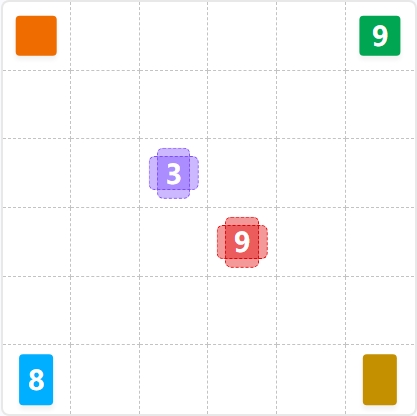
Solving Patches #29 requires a blend of geometric deduction and "outside-in" thinking. The grid contains 36 total units, and every square must be accounted for.
1. The "Square" Anchors
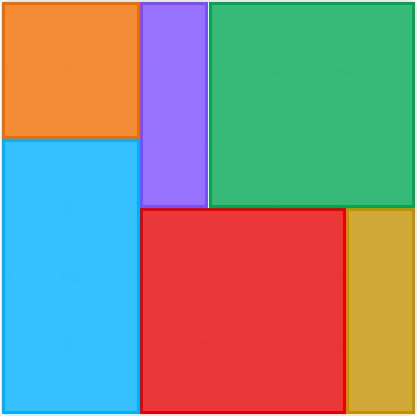
The most powerful clues are the Green 9 and Red 9. Because they are marked with square icons, they have zero dimensional flexibility; they must be . The Green 9 is fixed in the top-right corner. Once placed, it occupies the entire block in that quadrant.
2. Positioning the Red 9
The Red 9 clue sits at the intersection of row 4 and column 4. To remain a square without overlapping the Green patch, it is forced to extend to the bottom edge and slightly toward the center. This places it in columns 3, 4, and 5, spanning the bottom three rows.
3. The Blue 8 Constraint
With the Red 9 occupying column 3 at the bottom, the Blue 8 (a rectangle) is squeezed into the bottom-left corner. The only factors for 8 that fit here are . A horizontal layout would collide with the Red square, so the Blue patch must be a vertical block.
4. The Final Chain Reaction
The remaining gaps dictate the final shapes:
- The Purple 3: A narrow vertical gap remains in column 3 (rows 1–3), perfectly matching the Purple clue.
- The Orange Square: A void is left in the top-left corner, satisfying the Orange "Square" requirement.
- The Yellow Rectangle: A vertical sliver remains in the bottom-right corner, completing the grid.
🎓 Lessons Learned From Patches #29
- The "Perfect Square" Priority: Always start with numbers like 4, 9, or 16 that have "Square" icons. Their rigid dimensions act as the skeleton of the puzzle, forcing other flexible rectangles into specific orientations.
- Factor Isolation: When you see a number like 8, immediately visualize its possible pairs ( or ). In a grid, a is impossible, instantly narrowing your mental practice to a single shape ().
💡 Trivia
- The Power of 9: In a grid (36 units), two squares account for exactly 50% of the total area. This high "density" is why solving the two 9s first makes the rest of the grid collapse so quickly.
- Tessellation Limits: This specific grid is an example of "Exact Tiling," where no two shapes of the same color touch, and the total area of the clues perfectly sums to the area of the container ().
❓ FAQ
Why couldn't the Red 9 square be placed further to the right?
If the Red 9 moved even one column to the right, it would overlap with the Green 9 or leave a one-column gap that no other shape could legally fill. Patches logic relies on the "No Gaps" rule.
How do we know the Orange square is if it has no number?
In Patches, "blank" clues must expand to fill the remaining void while adhering to their shape icon. Once the Blue 8 and Purple 3 were placed, the only possible square that could fit the top-left corner was a (4 units).
Is there ever a scenario where shapes can overlap?
No. The core of the game is non-overlapping geometry. Through consistent practice, you will learn to use the boundary of one shape as the "wall" that defines the next.